Spreadsheets and JSON
AEM can ingest a spreadsheet from any supported content source via preview operation and transform it to structured JSON data which gets served at the corresponding .json path. These JSON files can easily be consumed by your website or web application.
The JSON can contain one or multiple sheets:
- If there is only one sheet, AEM will by default use it as the source of the information and deliver a single sheet.
- If there are multiple sheets, AEM will deliver all sheets that have names prefixed with
shared-. This lets you keep sheets in the same workbook that will not be exposed in the delivery. - If there is a sheet named
shared-default, AEM will deliver it as a single sheet - If there are multiple sheets with
shared-prefix, AEM will deliver them in multi-sheet format. See below for an example. - If there is a
sheetquery parameter with a sheet name, AEM will deliver the sheet namedshared-{name}as a single sheet.
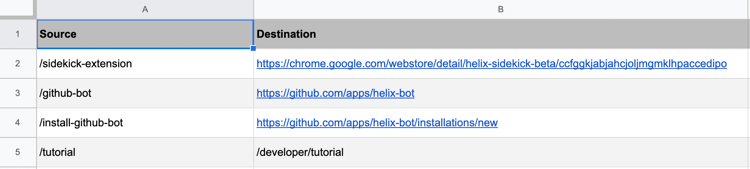
The simplest example of a spreadsheet consists of a single sheet with a table that uses the first row as column names and the subsequent rows as data. An example might look like this redirect sheet:
Single Sheet Format
This is the JSON version of the redirects sheet shown above, delivered at the URL /redirects.json:
{
  "total": 4,
  "offset": 0,
  "limit": 4,
  "columns": ["Source", "Destination"],
  "data": [
    {
      "Source": "/sidekick-extension",
      "Destination": "https://chromewebstore.google.com/detail/aem-sidekick/igkmdomcgoebiipaifhmpfjhbjccggml"
    },
    {
      "Source": "/github-bot",
      "Destination": "https://github.com/apps/helix-bot"
    },
    {
      "Source": "/install-github-bot",
      "Destination": "https://github.com/apps/helix-bot/installations/new"
    },
    {
      "Source": "/tutorial",
      "Destination": "/developer/tutorial"
    }
  ],
  ":type": "sheet"
}
- The
:typeproperty contains the JSON data format included in the payload. - The
columnsproperty contains an array of sheet header names. - The
dataproperty contains the sheet data as an array of JSON objects. - The
limitproperty contains the value of the specified limit query parameter. - The
offsetproperty contains the value of the specified offset query parameter. - The
totalproperty contains the number of total entries available.
Multi-Sheet Format
If there are multiple sheets with shared- prefixes, but none named shared-default, AEM will deliver them in multi-sheet format. Here's an example of a payload containing 2 sheets:
{
  ":names": [
    "first",
    "second"
  ],
  ":type": "multi-sheet",
  "first": {
    "total": 0,
    "offset": 0,
    "limit": 0,
    "data": [],
    "columns": []
  },
  "second": {
    "total": 0,
    "offset": 0,
    "limit": 0,
    "data": [],
    "columns": []
  }
}
- The
:typeproperty contains the JSON data format included in the payload. - The
:namesproperty contains an array with the names of the contained sheets. - For each sheet name in
:namesthere is a property in the payload. Its value is corresponding to the sheet data in single sheet format.
Query Parameters
Offset and Limit
JSON files can get very large, making them slow to download and process, or even impossible to deliver in a single payload (see also File Size Limits). In such cases, AEM supports the use of limit and offset query parameters to indicate which rows of the spreadsheet should be delivered. In case of a multi-sheet, offset and limit are applied to all sheets in the payload.
If no limit is specified AEM limits the number of returned rows to 1000. This is sufficient for most simple cases.
Sheet
The sheet query parameter allows an application to specify one or multiple specific sheets in the spreadsheet or workbook. As an example, ?sheet=jobs will return the sheet named shared-jobs as a single sheet, and ?sheet=jobs&sheet=articles will return the data for the sheets named shared-jobs and shared-articles in multi-sheet format.
Arrays
Native arrays are not supported as cell values, so they are delivered as strings.
"tags": "[\"Adobe Life\",\"Responsibility\",\"Diversity & Inclusion\"]"
You can turn them back into arrays in JavaScript using JSON.parse().
Previous
Markup - Sections
Up Next