
Edge Delivery Service Configuration for AEM Authoring
The Edge Delivery Service Configuration is the cloud configuration that connects an AEM site to its Edge Delivery Services project. It tells AEM which code and content repository to use, how to authenticate against the Edge Delivery Services Admin API, and how content is cached, delivered, and previewed/published.
Accessing an Edge Delivery Service Configuration
A configuration is created for every Edge Delivery Services site you create.
To access a configuration:
- Sign into the AEM author instance and go to Tools → Cloud Services → Edge Delivery Service Configuration
- Select the configuration that was automatically created for your site.
- Tap or click Properties in the tool bar.
The Edge Delivery Service Configuration dialog opens. It is organized into three tabs: Site, Authentication, and Resources.
Site
The Site tab contains general settings that identify your project and control content delivery.
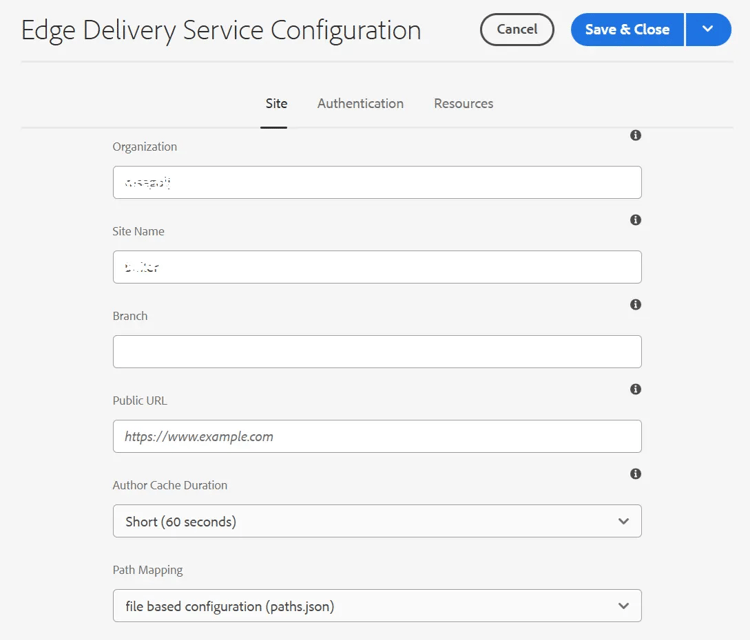
| Field | Description |
| Organization | The organization the site belongs to. This is the configured organization name (via the AEM configuration service) or the GitHub organization name. |
| Site Name | The name of the site. This is the configured site name (via the AEM configuration service) or the GitHub repository name. |
| Branch | The default branch used to author content. Leave empty to use main. |
| Public URL |
The public-facing base URL of the site (for example
|
| Author Cache Duration | Controls how long scripts, styles, and configurations are cached on the AEM author instance. Short (60 seconds) Default (5 minutes) Long (2 hours) Use a shorter duration while iterating on code or configuration so changes are picked up faster; use a longer duration for stable sites to reduce load. |
| Path Mapping |
How path mappings between AEM content paths and Edge Delivery Services delivery paths are resolved. file based configuration (paths.json) |
Authentication
The Authentication tab is used to manage credentials AEM uses to talk to the Edge Delivery Services Admin API and to reach protected sites.
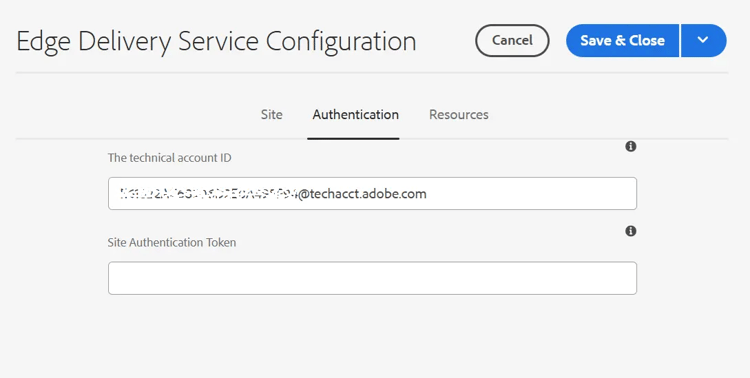
| FIELD | DESCRIPTION |
| The technical account ID | Read-only. The IMS technical account used to authenticate against the Edge Delivery Services Admin API on AEM as a Cloud Service. |
| Site Authentication Token | Authentication token used to access protected aem.page / aem.live sites. Provide this when your Edge Delivery Services site requires a token to be reached. The value is stored encrypted at rest. |
Resources
The Resources tab is used to manage additional resources loaded into the authoring experience.
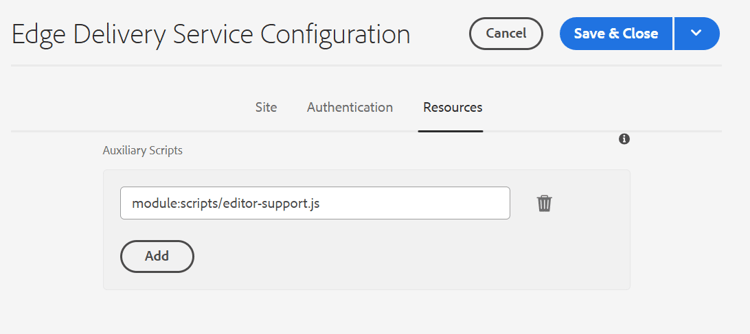
| FIELD | DESCRIPTION |
| Auxiliary Scripts | A list of scripts that are loaded only in the Universal Editor context (not on the delivered site). Use module references such as module:scripts/editor-support.js. Add one entry per script; use Add to append more and the trash icon to remove one. |