
Import Edge Delivery Services projects into Experience Workspace
Learn how to import your existing Edge Delivery Services project into Experience Workspace.
Prerequisites
- You have content living on Edge Delivery Services.
Import
- Under Apps, select Import.
- Choose your method of import.
- By Query Index - The index must be publicly available.
- By URL - The URLs must be publicly available.
- Define how linked content is handled.
- Behavior - Define if linked content is ignored or imported.
- Production Domain - Define
- Define the import destination.
- Organization - Define the org where you want to import the pages.
- Site - Define the site where you want to import the pages.
- This is a destructive operation. You may want to validate the import by first setting a drafts folder as a destination.
- Click Import.
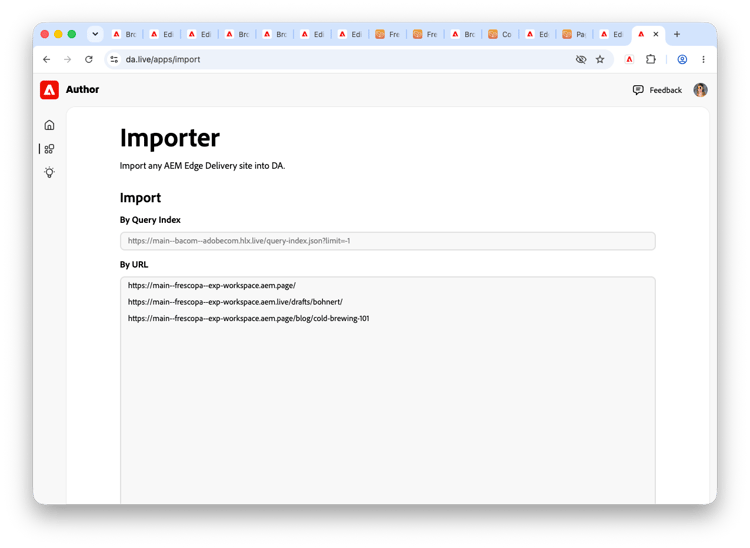
Within 30 seconds, the import should start. Depending on the import method and amount of content, it may take a moment to see the first results.
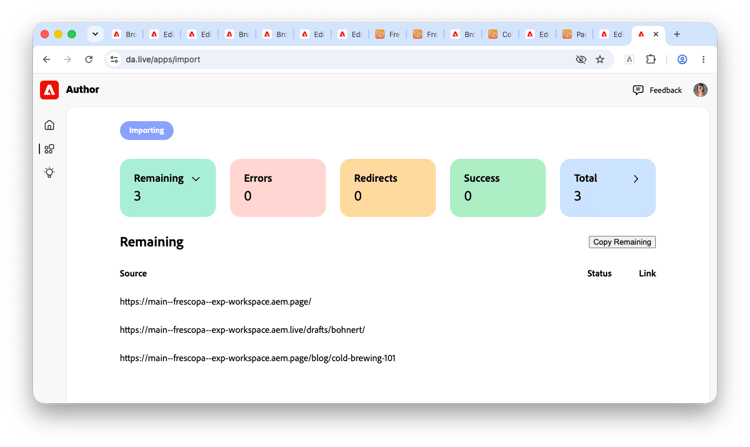
The results are grouped by Remaining pages, Errors, Redirects, Successes, and Total. Click the chevron in each grouping to expand the list of pages in that category to view the details.