
Extending Edge Delivery Services with micro-frontends
With Edge Delivery Services, gone are the days of esoteric technology stacks you must learn to empower your authors. You can bring your own preferred frontend technologies (vanilla, Lit, Preact, React, Angular, Vue, etc.), pair them with simple Edge Delivery APIs, and start adding value almost immediately.
One of the key drivers to this paradigm shift is an architecture pattern called micro-frontends.
Micro-frontends are the result of breaking down large user interfaces into smaller, more manageable and independently deployable pieces, with benefits at an organizational level.
- Natalia Venditto
Almost all apps on da.live and tools.aem.live are micro-frontends. What makes them micro-frontends?
- De-coupled from the main application - Being built and deployed separate from main applications means fewer checks necessary when deploying, and far less risk that an author-facing tool impacts the delivery of main applications.
- Low dependency count - While not a hard requirement, this directly influences the "manageable" and "independent" aspect of micro-frontends. The teams who work on these tools spend less time battling build systems and more time adding value.
- Abstractions kept to a minimum - Again, not a requirement, but this allows easier development and nimbleness due to limiting potential effects when making a change. You don't have to learn about ABC before you can change XYZ. You can just improve XYZ directly.
So much of building software involves people and process. With Edge Delivery Services, it becomes feasible to have an entire project singularly focused on author and creator productivity rather than trying to force your authoring tools into the same bundle as the website itself. Larger teams will appreciate the flexibility to work in smaller isolated groups while not worrying about impacting the main application.
When to use a framework
The overwhelming majority of Edge Delivery Services projects do not need SPA frameworks to deliver their site. For highly interactive authoring applications (like Experience Workspace itself), they can be beneficial, but it's important to not go overboard. The following is a helpful diagram to help you decide if you should use an SPA framework or not.
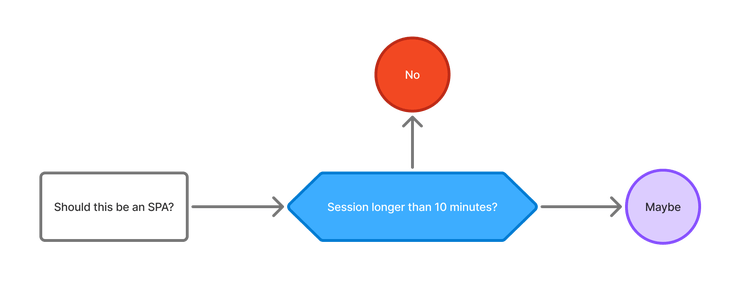
For completeness, this lab has both SPA framework based exercises (using Lit) as well as a pure JavaScript exercises.
What you're building
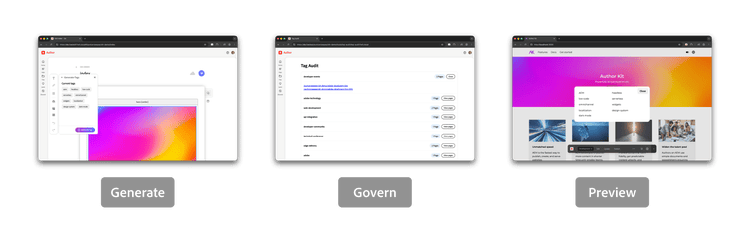
This document continues in a series of articles which guide you through building three micro-frontends:
- A GenAI tag / keyword generating author plugin
- A fullscreen tag audit application
- An AEM Sidekick plugin to surface tags a page uses
What you will need
- Node 20+
- A GitHub account
- An Adobe account
- The AEM CLI -
npm install -g @adobe/aem-cli - A code editor - Cursor or VS Code is recommended.
- AEM Sidekick
- Basic HTML, JS, and CSS skills
- An Edge Delivery Services project (we'll quickly scaffold one out in the first 5 minutes)
What you won't need
- Any browser extensions that manipulate headers - Please disable them in your browser (do not use the extension's own "off" toggle).
- Grammarly - Please disable this extension as well. It does not play well with Experience Workspace's library.
Up Next