
Preflight
Preflight is an always-on plugin in the Prepare menu that automatically uses the Governance Agent to check your document for common issues before you preview or publish.
What Preflight checks
Preflight helps you maintain consistency in your content that is aligned with your branding guidelines. It uses the Governance Agent to run checks to safeguard brand integrity and compliance across Adobe Experience Manager by enforcing your security, regulatory, and brand policies.
Using Preflight
- Open any document in Experience Workspace.
- Click Prepare in the menu bar.
- Click Preflight in the drop-down.
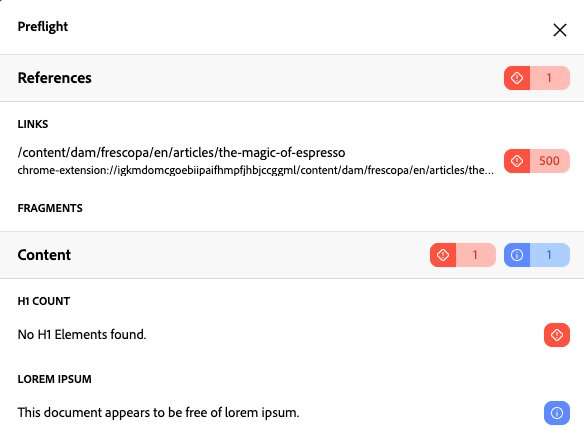
Correct any items that require attention and re-run the preflight checks to assure your content is on-brand.
Severity levels
- Error - Issues that are likely to negatively impact your content
- Warning - Issues that may be intentional but are worth reviewing
- Info - Informational notes
- Success - A check considered successful
Extensibility
You can provide your own custom version of Preflight by supplying a plugin with the same title in your prepare config. You would simply point to your own preflight MFE implementation.