
Setting up the Prepare menu
The Prepare menu allows authors to take action on a document, sheet, or piece of media before previewing or publishing. Since the Prepare menu options are typically related to content orchestration actions and can vary based on your needs, it is located next to the preview and publish buttons for easy and intuitive access to the authors and is represented by an ellipsis.
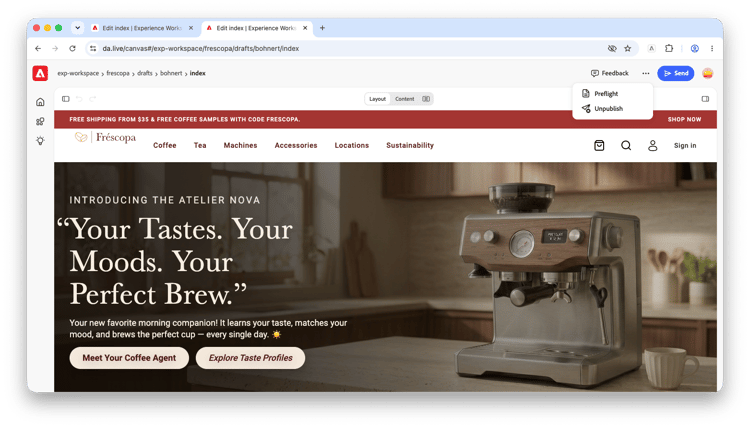
Plugins
The options in the Prepare menu are available as plugins and you can configure which are available for your own project. The plugins available in the Prepare menu fall under three use cases.
Always-on plugins
These plugins are always on regardless of any configuration.
- Preflight - Preflight checks your document for common mistakes such as seo anti-patterns, accessibility issues, broken links, etc.
- Unpublish - Unpublish a piece of content.
Feature-flag plugins
These plugins are built by Adobe and are only available if they're listed in the prepare config.
- Schedule Publish - Schedule a page or sheet to be published at a later time.
- Send to Adobe Target - Send a page or fragment to Adobe Target for personalization use cases.
Project plugins
These plugins are built for specific projects by users, partners, as well as Adobe. These use the same SDK as Library and Apps. Here are some examples:
- Rollout - Copy a page into its downstream languages or locales.
- Add to localization project - Add a page or sheet to a new or existing localization project.
- Add to Snapshot - Add a page or sheet to a new or existing snapshot manifest.
- Send for Review - Send a piece of content to Workfront or other workflow-like systems.
Configuration
The prepare menu is configured using a prepare tab in the Experience Workspace site or org config. See the Configs documentation for details on setting up configs.
Properties
The following properties are available for the prepare config.
title- The name of the plugin. This required field will be displayed to authors within the Prepare menu and is also used to lookup plugins from an org or an always on plugin.path- The path to your plugin. This field is required unless you are simply turning on a feature-flag plugin.icon- An optional fully-qualified path to your plugin's icon. If using an SVG, it must be available for cross-origin requests.ref- An optional parameter to gate plugin visibility to specific audiences. Useful for development, QA, or UAT testing.experience- An optional parameter to open the plugin in a fullsize-dialog instead of the default dialog. Useful for some plugins like Request Publish.
Example config
title |
path |
icon |
ref |
experience |
Send to Adobe Target |
||||
Schedule Publish |
uat |
|||
Send for review |
https://main--gov--geometrixx.aem.live/tools/workfront.html |
http://content.da.live/geometrixx/gov/docs/icons/workfront.svg#workfront-logo |
||
Rollout |
https://da.live/nx/public/plugins/rollout.html |
https://da.live/nx/public/plugins/rollout/media_195da69764de2782d555abed3042d8434a040e31c.png |
||
Request Publish |
https://main--aem-apps--adobe-rnd.aem.live/tools/plugins/request-for-publish/request-for-publish.html |
https://main--aem-apps--adobe-rnd.aem.live/tools/plugins/request-for-publish/request-for-publish.svg |
fullsize-dialog |
Each of the above rows represent a slightly different use case.
- Send to Adobe Target - This makes the Adobe-provided, but feature-flagged Adobe Target plugin available to all authors.
- Schedule Publish - This makes the Adobe-provided, but feature-flagged Schedule publish plugin available to users who use the
?ref=uatquery param. - Send for review - This makes a custom plugin available to all authors.
- Rollout - This makes the early-access Rollout plugin from Adobe available to all authors.
- Request Publish - This makes the early-access Request Publish plugin from Adobe available to all authors.
Understanding inheritance
The Prepare menu uses an inheritance model for configurations. This gives you the flexibility to:
- Overwrite an always-on / Adobe-provided plugin with your own version of the same name.
- Have sites selectively inherit from their parent org.