
Set up the Universal Editor
Deprecation notice
Adobe Commerce is not onboarding new customers onto the Universal Editor authoring tool. For customers wanting a visual authoring experience, Adobe recommends using Experience Workspace.
Existing customers using Universal Editor and customers who are currently in implementation with Universal Editor will continue to have access to the tool.
Requirements
- You have a "DX Handle" - ie.
@nameofmycompany(found in the URL onexperience.adobe.com). - Your IMS Org / DX Handle has Universal Editor enabled (this currently requires AEM Sites credits).
- You have a site on da.live.
- You have Author Bus-compatible Universal Editor instrumentation.
component-models.jsoncomponent-definitions.jsoncomponent-filters.json- Any code necessary to make an intuitive authoring experience (please see the developer documentation)
- This use case of the Universal Editor supports Chrome and Safari browsers only.
To use your own project with Universal Editor, the instrumentation is required. The Universal Editor is controlled and customized for your project using the extra JSON files. More details can be found in the developer documentation.
Setup
Add the editor path to your Experience Workspace org config https://da.live/config#/{{name-of-org}}/:
editor.path
/org/site/path/to/content=https://experience.adobe.com/#/@adobecomdx/aem/editor/canvas/main--da-block-collection--aemsites.ue.da.live
Please note:
- If the browsing path is a descendant of the config path, users will automatically be taken to the Universal Editor. If the user is in the org, they will be presented with an option to open in Universal Editor from a document.
- Note the
@adobecomdxhandle. You will need to supply your own. - Note the final hostname after
/canvas/. You will need to update this to match your project's subdomain + ue.da.live.
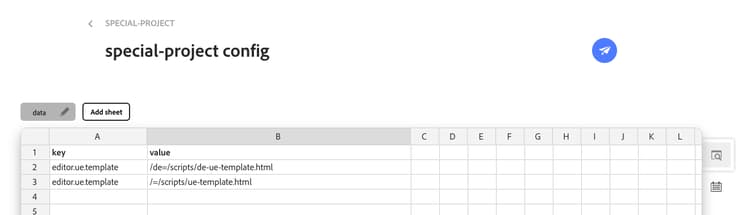
Custom page template for new pages (optional)
Page templates are used when creating new pages. By default, an empty page with only one section is always created. This is an optional configuration if you want to use custom page templates.
If you want to create pages with initial content or layout, you can create one or more page templates. These are simply HTML files in the project Git repository. Please see https://github.com/mhaack/special-project/blob/main/scripts/ue-template.html for more information. The templates are registered in the Experience Workspace site or org properties on a specific path. A project can use multiple page templates e.g. per language or region or sub site area.
FAQ
Can I edit the same document in both editors?
Yes
If I decide on Experience Workspace today, but want to use the Universal Editor tomorrow, am I stuck?
No. If you go with one path today, you can change at any point down the road.
Are plugins, extensions, etc. compatible between the two editors?
These are different implementations. Please reach out if you have an existing plugin / extension you would like in a different editing context.
Do I need to create Universal Editor instrumentation for sections, default content or images?
No. This is already done for you in the da-block-collection and can be copied more or less one to one. For more instructions on how to do this for you own project see the developer documentation.
Can I edit content fragments with the Universal Editor on Author Bus?
No
Does this mean that my investments in authoring in AEM with the Universal Editor are obsolete?
No. Authoring in AEM with the Universal Editor is still the official, non-early access, expression of the Universal Editor.
If I want to move from authoring in AEM with the Universal Editor to the Universal Editor on Author Bus, can I do this?
Yes. The Universal Editor instrumentation of your blocks can be mostly reused with some minor adjustments. Please reach out to Adobe for additional assistance.
I am a partner, how should I help my customer decide on a direction?
First, there is never a right or wrong direction, but a mismatch of needs vs feature set. Adobe's stance is to pick the content repository and editing interface that authors want to use. As a partner, you should provide the benefits of each authoring modality (WYSIWYG, Forms, Document) and then let actual authors try each for themselves, and guide them based off their needs and feedback from their experiences.