Architecture

Edge Delivery Services are part of Adobe Experience Manager (AEM). A key aspect of the architecture is to let customers build on the infrastructure and processes they already use.
How it fits in
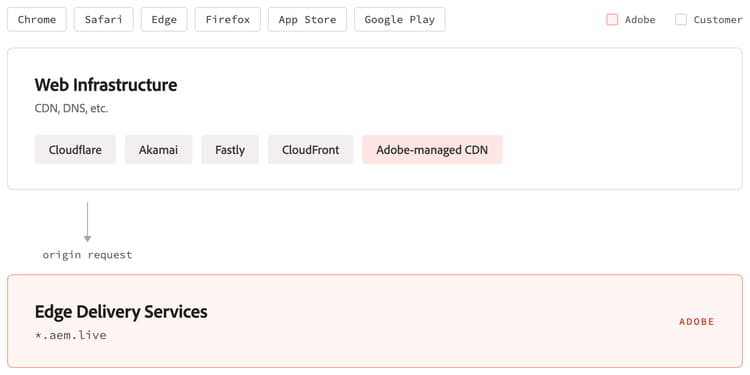
At the highest level, Adobe Experience Manager (AEM) is an on origin service that you plug in to your existing Content Delivery Network (CDN). We have out of the box integrations with Akamai, Cloudflare, Fastly, and Amazon CloudFront. Alternatively, Adobe can manage the CDN tier for you.
The AEM stack is engineered for high performance and availability. In order to achieve the best possible availability, all our delivery services are run in two fully redundant edge providers, have fully redundant storage infrastructure, and are closely monitored for performance.
The full picture
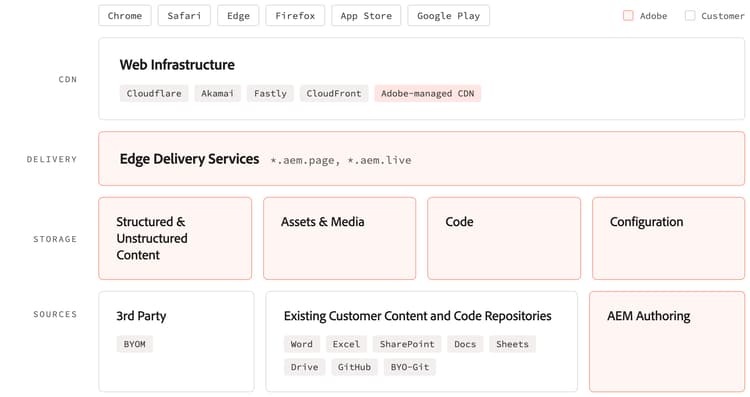
Looking at the full stack, there are four key layers:
- Adobe-managed or existing customer-specific web infrastructure like CDNs, DNS, TLS certificates, etc.
- Adobe’s edge delivery layer
- Adobe’s storage layer for delivery
- Adobe-managed or customer-specific sources of content and code
In the top tier of this architecture, Edge Delivery Services customers use the Adobe-managed CDN or their existing CDNs, DNS, certificates, etc. which is then delivering the AEM-produced content to all modern web browsers, native mobile applications, LLMs, or other backend applications.
The two central tiers are dual stack: two completely separate implementations of the delivery service running in parallel, so the site stays available if one implementation fails. It serves content from the storage layer, which is organized into four containers (Content, Media, Code, and Config), described below.
The bottom tier is where content can be ingested from: AEM Authoring, which includes Document Authoring (DA) as well as AEM Sites Author, Microsoft SharePoint (Word and Excel), or Google Drive (Docs and Sheets). In addition, our generic bring-your-own-markup interface enables ingestion of structured and unstructured content from any 3rd party system. It can also be configured as an optional overlay of the main content source.
How content gets published
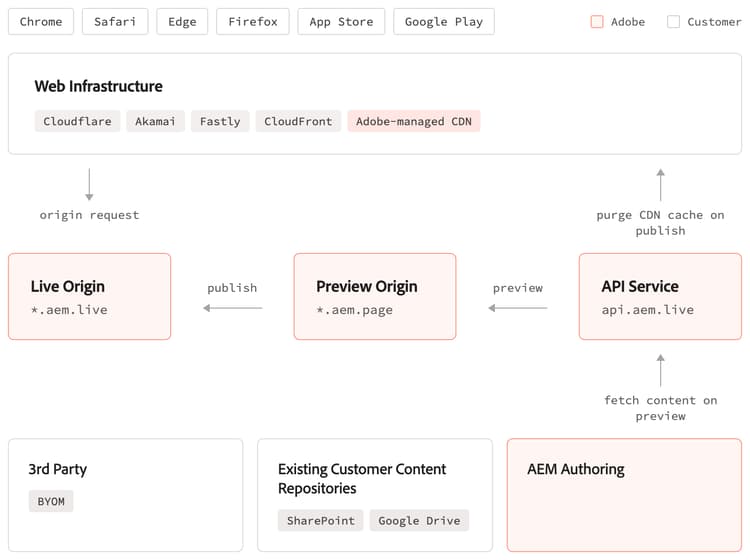
The publishing process is facilitated by the API Service for preview and publishing and consists of two key steps, both triggered by authors through the AEM Sidekick or directly from AEM Authoring.
The preview operation will pull content from the configured content source and stores it in AEM’s storage layer in standardized formats for structured and unstructured content. Authors get an instant URL to preview their content changes and share with others for review.
In a second step, authors can publish content. This operation takes the previewed content and makes it available to the delivery tier of our infrastructure. The most important step here is to instantly push-invalidate the relevant files in the CDN's cache. AEM will purge every layer of the caching infrastructure, thanks to its deep integration with various CDN providers.
What about code?
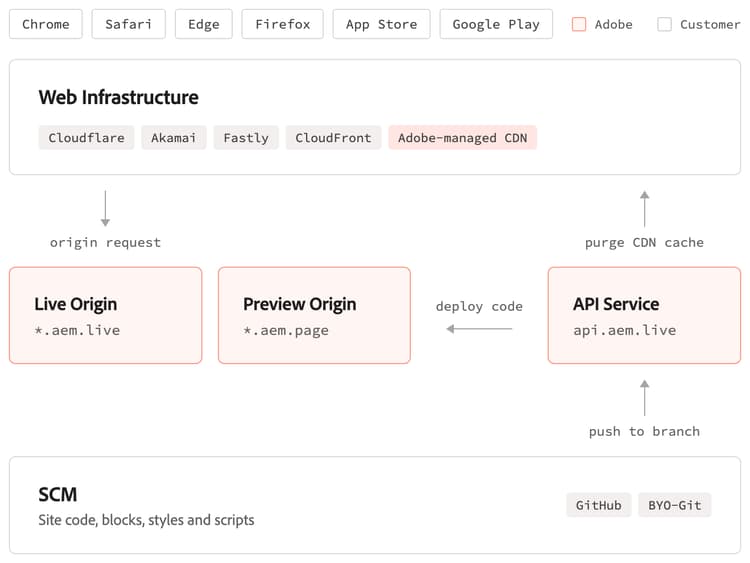
By default, AEM fetches the project code directly from your configured GitHub repository using the AEM code sync app for GitHub which gets installed during the initial project setup. If GitHub is not an option for you, you can also configure a code repository from a different provider via Cloud Manager and leverage our bring-your-own-git interface.
AEM pulls code from all active branches, enabling effective parallel development and scalable testing. Each feature branch has its own dedicated URL, allowing quick validation of code changes with real life content. When code is merged into the main branch, the CDN cache will automatically be purged of all affected resources, making deployments instant and easy.
Lifecycle differences of Source, Content, Media, Code, and Configuration
Internally, AEM separates the resources needed to assemble and deliver a website by their lifecycle and manages each in its own container:
Source Bus (documents and spreadsheets) stores content authored in Document Authoring in its authored form, before it is previewed or published. This container cannot be accessed via Delivery Service, only via our API Service.
Content Bus (text in documents and spreadsheets, PDFs, SVGs, redirects, etc.) holds previewed and published content and follows the lifecycle states of preview (being worked on or for review) and publish (published on your production site). Content is immediately available with all code branches on the corresponding .aem.page and .aem.live URLs depending on their previewed / published state.
Media Bus (images and videos uploaded or copy/pasted into a document) uses Content Addressable Storage internally, meaning every asset is stored only once with a unique hash following the media_ prefix. Media is accessible on all branch URLs across .aem.page and .aem.live as soon as it is added to the system via a preview operation of the asset itself or a document containing the asset. Since the hash is produced from the binary content of the asset itself, it is immutable and can be cached permanently.
Code Bus (JavaScript, CSS, etc.) is managed in branches, creating individual environments for every branch. Changes made in any branch are visible across .aem.page and .aem.live URLs at the same time.
Config Bus (organization and site-level configuration, via the config service) uses inheritance from a profile and is immediately applied to all branch environments on both .aem.page and .aem.live for a particular site.
Up Next