Repoless - One codebase, many sites
If you have many similar sites that mostly look and behave the same, but have different content, you may want to share code across multiple sites. In the past, the best way to do this was to create multiple GitHub repositories, keep them somehow in sync, and run each site off a dedicated GitHub repository.
AEM supports running multiple sites from the same codebase without having to take care of code replication. This ability is also known as "repoless", because all but your first site don't need a GitHub repository of their own.
Follow this document to learn how to create and manage multiple sites off the same codebase. Make sure you have followed the developer tutorial, as it provides the basics of creating a site on AEM.
How this works
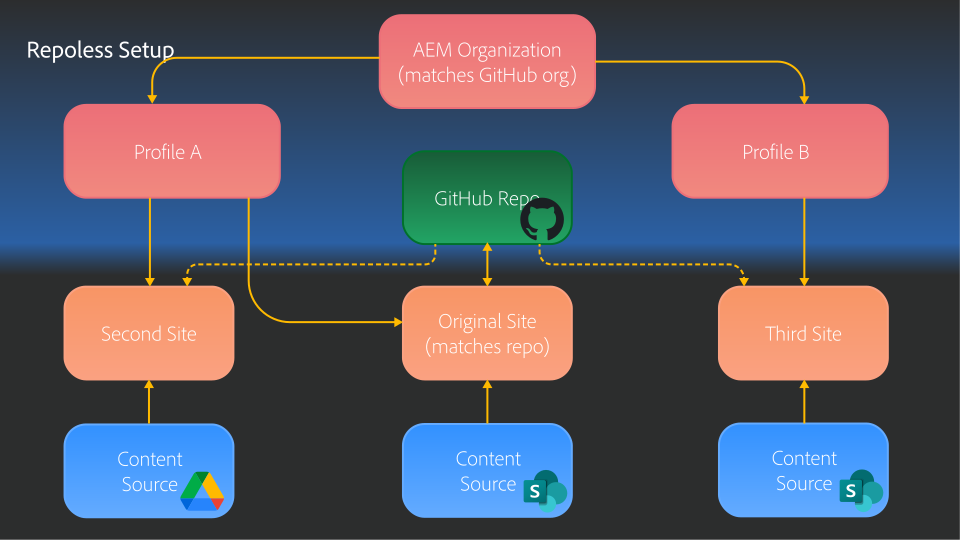
Repoless sites are enabled by the Configuration Service in Adobe Experience Manager, which introduces a couple of concepts such as Organization, Profile, Repository, Site, and Content Source. The following diagram shows how the pieces fit together.
https://main--helix-website--adobe.aem.page/svgs-for-migration/architecture-repoless.svg
Organization
Each site in Adobe Experience Manager belongs to an organization. This organization has the same name as an org on github.com, so that there is no naming conflict. An organization can have multiple sites, profiles, and users.
Profile
Profiles are a way to group and re-use important configurations such as headers, indexes, additional metadata, and so on. A profile can be used by multiple sites within an organization, so that there is consistency among them.
GitHub Repository
For each codebase in Adobe Experience Manager, there is one GitHub repository. By creating a first site that uses this repository through AEM Code Sync, this code will be made available to Adobe Experience Manager and can then be used by multiple sites. When updates are pushed to the GitHub repository, they apply to all sites that use this codebase.
Site
A site combines content, code, and configuration to create a new web experience. Configuration can be attached directly to the site, or it can be referenced from a profile. While a profile can be used by multiple sites, each site can have only one profile. When there is a conflict between the configuration settings in a site and in a profile, the site configuration wins.
Which content source and which codebase to use for a site are configuration settings, too. This enables the re-use of code and repoless sites.
Content Source
The content that makes up a site is pulled from a content source when authors preview or publish content. Typical sources include Microsoft Sharepoint and Google Drive, or the bring-your-own-markup adapter.
Preparation
Pre-requisites
- GitHub Repository:
https://github.com/{owner}/{repo}
Note: If your organization is unable to use GitHub, see our Bring your own Git documentation.
The first step to creating a bunch of sites sharing the same codebase is to create a first canonical site. This site can be used to serve content, but its most important job is to ensure that code is getting synchronized from your GitHub repository to all sites that use the same codebase.
Create your first site
If this is your very first site, the easiest way to create your first site is to follow the steps of the developer tutorial. It only takes a few minutes and will ensure your org and site will be set up in the configuration service for you, using the GitHub owner as org and repo as site name.
If you already have an aem.live org and other sites configured, you can use the Admin API to create new sites. See below for an example API request.
Create a repoless site
Pre-requisites
- Canonical site configured with code and content repository
- Content source URL with the content you want to use for the repoless site, e.g.
https://content.da.live/{org}/{site2}/ - Access token for the Admin API
Create your first repoless site
Using the Admin API, you can create a new configuration for the first repoless site. Replace all variables in curly brackets with your actual details:
curl -X PUT https://admin.hlx.page/config/{org}/sites/{site2}.json \
  -H 'x-auth-token: {token}' \
  -H 'content-type: application/json' \
  --data '{
  "code": {
    "owner": "{owner}",
    "repo": "{repo}"
  },
  "content": {
    "source": {
      "url": "https://content.da.live/{org}/{site2}/"
    }
  }
}'
The new site is instantly available at https://main--{site2}--{org}.aem.page. On first access, most likely only the 404.html will be shown, because no content has been previewed yet. You can preview content directly from the content source, or using the AEM Sidekick.
Now you have multiple sites with different content repositories but sharing the same code base.
To load your new site during local development, use the ––url option on the aem up command to specify the new site’s url, like:
aem up ––url https://main––{site2}--{org}.aem.page
What’s not needed once you go repoless
When you start with Adobe Experience Manager, many settings are kept either with your content in the content source, or in the GitHub repository next to your code. With the Configuration Service there is now a central place for these kinds of settings.
Below gives you a comparison between how different areas are configured when we use the document mode (the traditional, distributed configuration) vs. using the Configuration Service API.
| What | Document Mode | API Mode |
|---|---|---|
| Content Source | fstab.yaml |
ContentConfig |
| Folder Mappings | fstab.yaml |
FoldersConfig |
| robots.txt | robots.txt in Github |
RobotsConfig |
| CDN | .helix/config.xlsx | CDNConfig |
| Headers | .helix/headers.xlsx | HeadersConfig |
| Additional Metadata | .helix/config.xlsx | MetadataConfig |
| Access | .helix/config.xlsx | AccessConfig |
| Sidekick Plugins | tools/sidekick/config.json |
SidekickConfig |
| Index Definitions | helix-query.yaml in GitHub |
IndexConfig |
| Sitemap Definition | helix-sitemap.yaml in GitHub |
SitemapConfig |
Previous
Developer Tutorial
Up Next